Planning Weeks Ahead
Your trip is coming up. Use the web planner on desktop to organise everything before you arrive.
Before You Start
- ParQwish Planner (PWA) open on your desktop or tablet
- Your trip dates and any confirmed dining reservations
Steps (9)

Click + New Trip on the home screen. Quick Trip starts one right away, dated today (from your default template, if you've starred one), and keeps you on Home; set its real dates with the ✏️ next to it. From Template lets you pick a saved template and opens the Edit Trip page with the dates ready to set, and Full Detail opens the Edit Trip page for a new trip, which is saved when you click Create Trip. A template carries over your packing list, your wishes, your hotel, and your notes.

The Edit Trip page opens as soon as you create a trip (reopen it later from the ✏️ next to the trip). Everything is on one page: add your flights, hotels, and transportation, with confirmation numbers, check-in dates, and shuttle details. The menu at the top jumps between sections, and Save keeps it all.
Tip

The Park Catalog sits beside your wish list. Search it, or browse rides with their typical wait, height requirement, and Lightning Lane at a glance, then click + Plan to add one. Each wish gets a ride ticket (E = Must Do, D = Really Want, C = Want, B = Maybe, A = If Time) and an optional max wait time for rides. Don't worry about order yet — you'll schedule on the Preview timeline.
Tip

This is used on the mobile app's Home screen to show a 'Ready Now' list of rides currently under your threshold. It stops you wasting time waiting when there's a better moment later in the day.

Pick a category on the left (and a sub-category like Shoes or Toiletries to narrow it), then click + Pack on anything in the catalog column — or add a whole ensemble in one click. Use + Add New for anything specific to this trip (e.g. 'autograph book', 'kids' ear protectors'); it's saved to your catalog for next time.

Select a date using the date picker bar. Drag items from the pool on the left onto the timeline. The park map on the right shows where each item is located so you can group nearby attractions.
Tip

Each item on the timeline is plotted as a pin on the map. If you see a lot of back-and-forth between opposite ends of the park, rearrange items on the timeline to reduce walking.
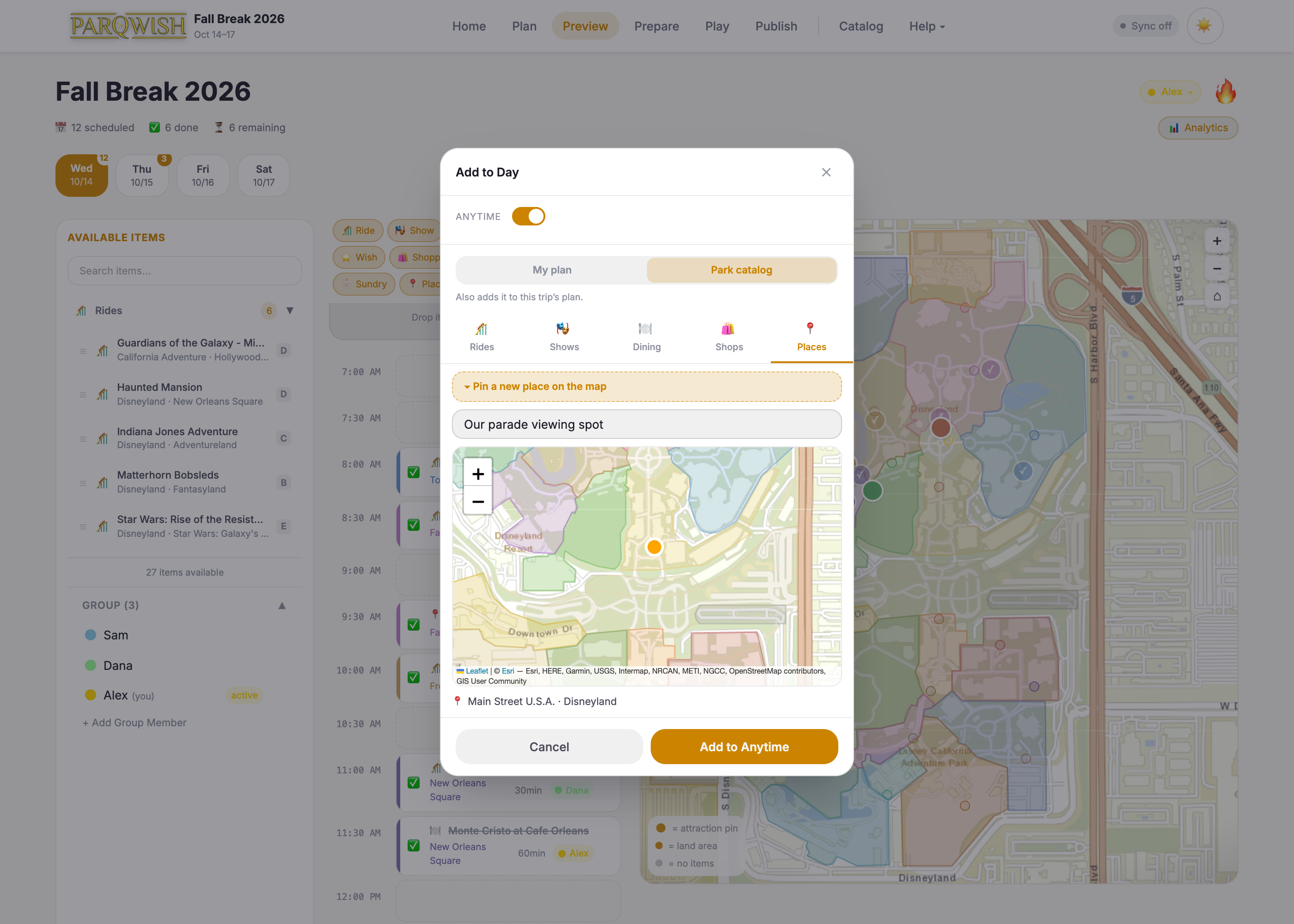
Click an empty time slot (or + Add in the Anytime section) to open Add to Day. Switch to Park catalog to add any ride, show, restaurant, shop, or place without going back to Plan — it's added to the trip's plan too. For somewhere that isn't in the catalog, like a parade viewing spot or a meeting point, choose Places › Pin a new place on the map, name it, and click the map. ParQwish works out the park and land for you.

You can re-export as many times as you like as your plan evolves — each import on the phone uses Merge mode to apply only the changes.
Tip
A fully built trip plan — wish list prioritised, packing list ready, day-by-day timeline built — ready to load onto your phone the morning of your visit.